
Everest for Mac
Mountain Everest Max and DisplayPad, on your Mac.
Mountain’s Base Camp only runs on Windows. Everest gives the Everest Max and the DisplayPad their lighting, pictures, actions and profiles on macOS, with no driver.
Version 0.2.1 · 4.2 MB · macOS 13 or later · Apple silicon and Intel
- Notarized by Apple
- Updates itself
- Free and open source
Not affiliated with Mountain. Source on GitHub
Features
Every key gets a job.
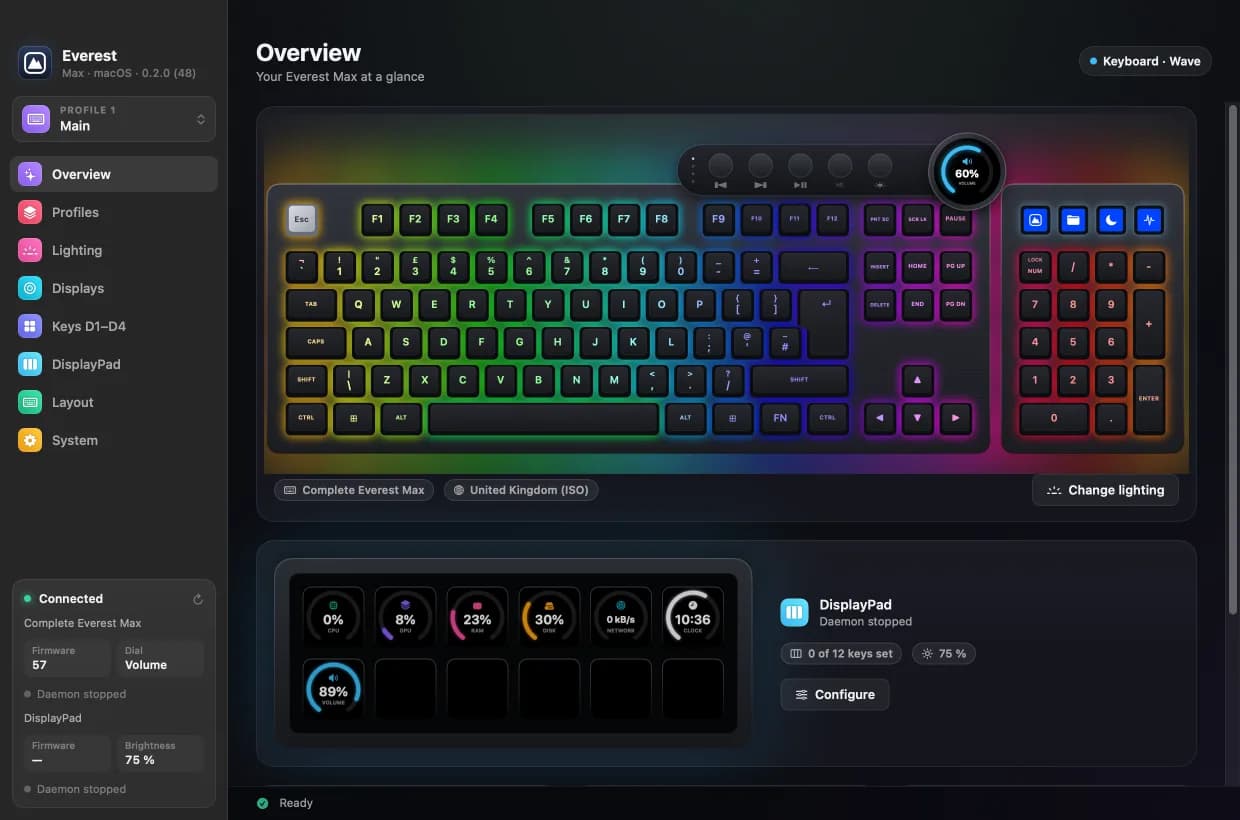
Pictures, actions, lighting and profiles for your Mountain devices, from the menu bar.
New to this? Read how to use a Mountain keyboard on a Mac
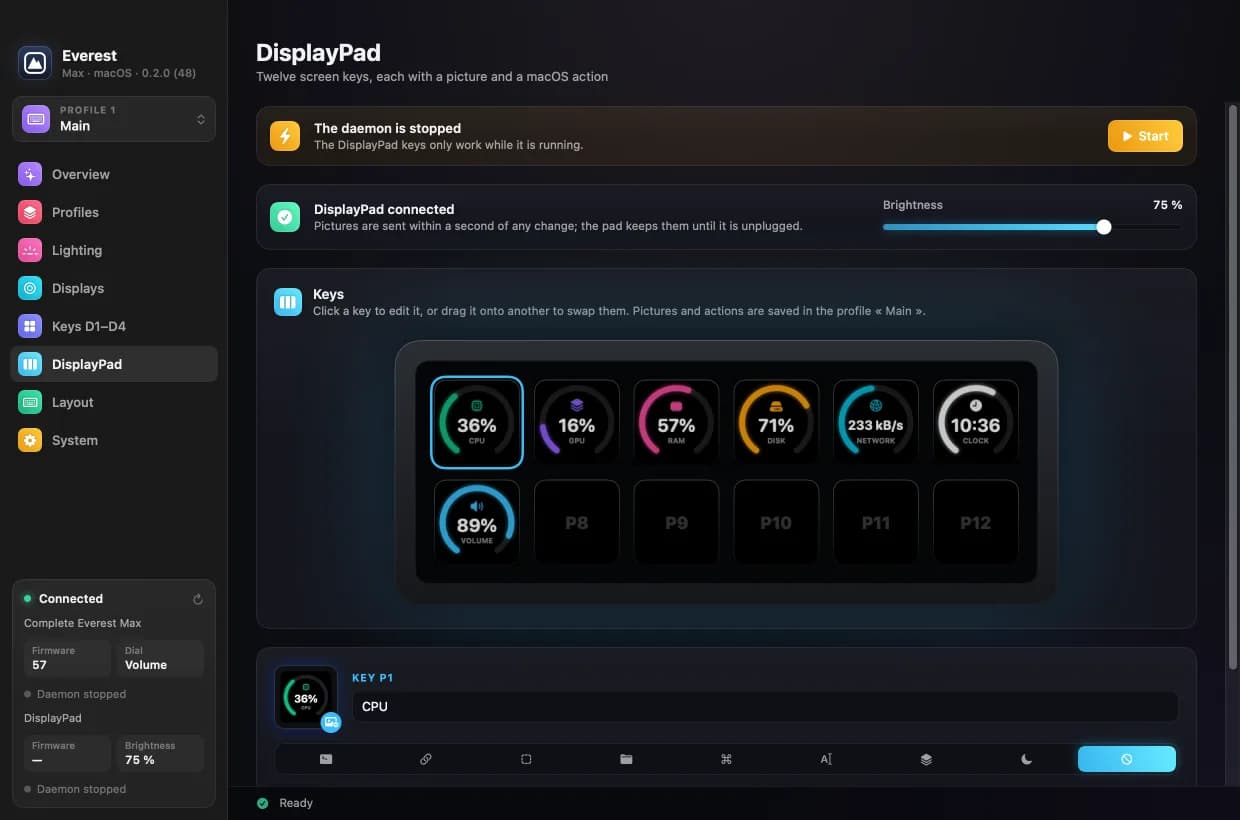
- DisplayPad and D1–D4
- Ready-made icons, any app’s icon or your own image on every key, each with an action: an app, a URL, a shortcut, typed text or a command.
- Live keys
- CPU, GPU, RAM, disk, network, volume and the time on a key, redrawn when the value changes. Add your MRR, revenue and commits with an MRR Calendar token.
- RGB lighting
- The keyboard’s own effects, plus a dozen per-key effects rendered on the Mac, with your palettes and per-key painting.
- Profiles
- Five profiles with their own lighting, keys and dial screen. Link an app to a profile and it switches when that app comes to the front.
- Night mode
- One key turns off the lighting, the screens and the pad and mutes the sound. The same key brings everything back as it was.
- Menu bar and command line
- Keeps working with the window closed, reconnects when a device is replugged, and every feature is also available from the command line.
Install
How to use your Mountain keyboard and DisplayPad on a Mac.
Three steps, for the Everest Max as for the DisplayPad.
Step 1: Download Everest
One disk image for Apple silicon and Intel Macs, on macOS 13 or later. It is free, with no account.
Step 2: Drag it to Applications
Open the disk image and drag Everest onto Applications. It is notarized by Apple, so macOS opens it without any workaround.
Step 3: Plug in your device
Everest finds your DisplayPad or Everest Max and reads its firmware. Grant Accessibility if your keys will send shortcuts or typed text.
Compatibility
Check your device first.
Everest reads the firmware before writing anything. On a firmware it has not been tested on, it sends nothing and explains why.
| Device | Status |
|---|---|
| Mountain DisplayPad | Tested on firmware 8 and firmware 4, the only ones Everest writes to |
| Everest Max, UK-ISO | Tested on firmware 57, the only firmware Everest writes to |
| Everest Max, other layouts | Detected and drawn from Base Camp’s tables, not tested on hardware |
| Everest Core | The same keyboard without the modules, not tested |
| Everest 60, Makalu, MacroPad | Not supported: different protocols |
What’s new in 0.2.1November 5, 2026
- MRR Calendar guide: System › MRRCalendar now links to the guide for connecting your account and putting your numbers on keys.
MRR Calendar
Your revenue, on your desk.
With a free MRR Calendar account, DisplayPad keys can show your MRR, today’s sales, 30-day revenue and today’s commits, refreshed on their own.
FAQ
Before you install.
- Does Mountain Base Camp work on a Mac?
- No. Mountain’s Base Camp only runs on Windows. Everest is a free alternative for macOS that talks to the DisplayPad and the Everest Max directly, with no driver.
- Is this an official Mountain app?
- No. Everest is an independent, open-source project, not affiliated with Mountain.
- Do I need an MRR Calendar account?
- No. Everest is free and works entirely on its own. The MRR, revenue and commits keys are the only part that needs an account, and they are optional.
- Does it update the firmware?
- Never. App updates only change the app. Firmware stays with Base Camp on Windows, and Everest sends nothing to a device running a firmware it has not been tested on: it shows an explanation instead.
- Is it safe for my keyboard?
- Lighting, profiles and actions are ordinary settings. Pictures on the keyboard’s D1–D4 keys and dial use the same mechanism as a firmware update, in the sequence Base Camp itself uses, so do not unplug the keyboard during a transfer. DisplayPad pictures only live in its memory. The software is provided as is, without warranty.
- How do updates work?
- The app checks once a day. A new version downloads in the background, a dot appears on the menu bar icon, and Restart to Update installs it. You can check by hand from the menu, or switch this off in System › Updates.
- Which permissions does it need?
- Accessibility for key combinations and typed text. Full Disk Access only for the Claude and Codex usage keys, which read CodexBar’s data. Everything else works without either.
- Who made it?
- Axel Louisy-Louis created the project, and the team behind MRR Calendar now develops and maintains it. The code is open source under the MIT licence.
Give your Mountain gear a Mac app.
Version 0.2.1 · 4.2 MB · macOS 13 or later · Apple silicon and Intel
Created by Axel Louisy-Louis, developed and maintained by the team behind MRR Calendar. “Mountain”, “Everest”, “DisplayPad” and “Base Camp” are used only to say which devices this software works with.