Why it works
Most founders wait until the numbers look good before showing them. That instinct is wrong.
The value of a live metric in your bio is not the number — it is the progression. Someone who follows you at $27 MRR watches you reach $100, then $500, then $1K. They feel invested. They remember you when you ship something new. That kind of attention is earned slowly, and a live bio is one of the few places where it builds automatically.
Showing the struggle matters. A red meter at 20% does not signal failure — it signals commitment. You are tracking, you are accountable, you are not hiding. That is rarer than it sounds, and people respond to it.
What your bio looks like
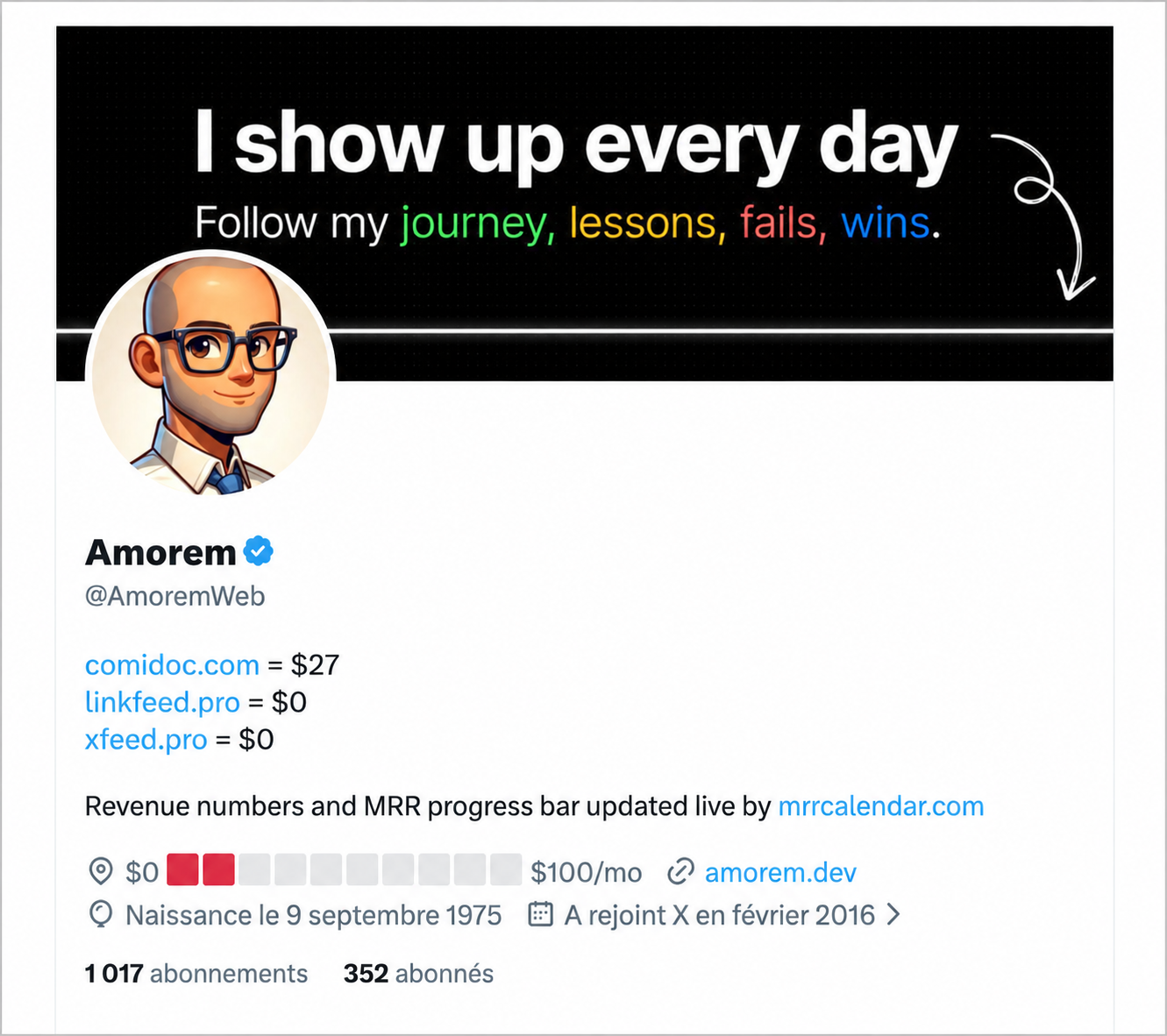
The bio shows live revenue per project — $27 for comidoc.com, $0 for two others just launched. The location field shows the traffic palette at the start: two red segments out of ten, building toward $100/mo. The attribution line is automatic on the free plan. All values update on a schedule without touching the profile.
What to publish
At pre-revenue, keep the goal modest. $1K MRR is specific and credible. A $100K goal from an account with no product yet reads as wishful thinking. A goal you are visibly chasing is more compelling than an ambitious one with no movement on the bar.
At early revenue, show the exact number. $27 MRR is more honest than $30 MRR, and followers notice precision. The bio is not a pitch deck.
As you grow, the traffic palette does the work for you. Red means grinding. Orange means building. Green means arriving. No caption needed — the color is the update.
Near a milestone, switch to manual goal mode and pin the target you are chasing. The last two or three segments of the bar are the most watched. People who have seen the meter inch forward for months will share that final moment with you.
For the location field, the default $0 → $10K/mo framing sets a clear narrative: a starting point, a direction, and a live bar between them. On every tweet, when someone hovers your avatar, they see where you are in the journey. Most accounts leave that field blank or use a city name — using it intentionally is a small but real edge.
One thing worth avoiding: setting a goal so high that the bar never visibly moves. At $500 MRR with a $500K goal, the meter looks stuck for years. Set a goal you expect to reach in the next few months.
What gets updated
MRR Calendar updates two fields on your X profile:
- Bio — up to 160 characters. This is where most people put the progress bar and their current number.
- Location — up to 30 characters. Shows up right under your display name. Surprisingly visible.
Both fields use the same template syntax. You write a template with curly-brace tokens, and MRR Calendar fills them in with fresh values on every sync.
Choosing a metric
Three metrics are available for the progress bar:
- MRR — Monthly Recurring Revenue from active subscriptions
- ARR — Annual Recurring Revenue (MRR multiplied by 12)
- Revenue (30d) — cash collected in the last 30 days, including one-time sales
For subscription businesses, MRR is almost always the right choice. It tracks momentum over time and smooths out the week-to-week noise of any individual sale. Revenue (30d) makes more sense if you sell mostly one-time products such as templates, plugins, or courses where subscriptions are not the primary model.
The progress bar
The {meter} token renders a 10-segment emoji progress bar. As your metric climbs toward your goal, more segments fill.
Shapes
Square segments feel more structured and product-like. Circle segments are softer.
Square: 🟩🟩🟩🟩🟩⬜⬜⬜⬜⬜ (50%)
Circle: 🟢🟢🟢🟢🟢⚪⚪⚪⚪⚪ (50%)
Color palettes
Uniform — one color, every segment the same:
Square: 🟩🟩🟩🟩🟩🟩🟩🟩🟩🟩 (full) 🟩🟩🟩🟩🟩⬜⬜⬜⬜⬜ (50%)
Circle: 🟢🟢🟢🟢🟢🟢🟢🟢🟢🟢 (full) 🟢🟢🟢🟢🟢⚪⚪⚪⚪⚪ (50%)
Traffic — red at the start, orange through the middle, green at the end:
Square: 🟥🟥🟧🟧🟨🟨🟩🟩🟩🟩 (full) 🟥🟥🟧🟧🟨⬜⬜⬜⬜⬜ (50%)
Circle: 🔴🔴🟠🟠🟡🟡🟢🟢🟢🟢 (full) 🔴🔴🟠🟠🟡⚪⚪⚪⚪⚪ (50%)
Rainbow — red through the full spectrum to purple:
Square: 🟥🟥🟧🟧🟨🟩🟦🟦🟪🟪 (full) 🟥🟥🟧🟧🟨⬜⬜⬜⬜⬜ (50%)
Circle: 🔴🔴🟠🟠🟡🟢🔵🔵🟣🟣 (full) 🔴🔴🟠🟠🟡⚪⚪⚪⚪⚪ (50%)
The traffic palette works well for milestone-style bios: early on it shows red, signaling you are still building, and turns all green when you hit your goal. People who follow you long-term will notice that moment.
Goal modes
- Auto — MRR Calendar picks the next logical milestone above your current value. The sequence goes: 100, 500, 1,000, 5,000, 10,000, 25,000, 50,000, and so on. When you cross one, the goal shifts to the next automatically.
- Manual — you set a fixed number and the goal stays there until you change it.
Auto mode is lower maintenance and produces natural-looking progression. Manual mode makes sense when you have a specific public goal you want to commit to.
Template tokens
Global tokens are available in any template:
{meter}— the emoji progress bar{value}— current metric value in compact format (e.g.,$4.1K){goal}— goal value in compact format (e.g.,$10K){metric}— metric label:MRR,ARR, orRevenue (30d){progress}— percentage toward the goal (e.g.,41%){public_page}— your MRR Calendar public page URL{powered_by}— attribution text, required on the free plan
The default bio template:
{meter} {value}/{goal} {metric}

{powered_by}
Rendered example (square, uniform, 41% to $10K MRR):
🟩🟩🟩🟩⬜⬜⬜⬜⬜⬜ $4.1K/$10K MRR

Revenue numbers and MRR progress bar updated live by mrrcalendar.com
On paid plans, {powered_by} is optional and you have the full 160 characters to use freely.
The location field
The location field has a 30-character limit. The default template:
$0 {meter} {goal}/mo
Rendered example:
$0 🟩🟩🟩🟩⬜⬜⬜⬜⬜⬜ $10K/mo
The $0 is literal text marking the starting point. The overall effect reads as "building from $0 to $10K/month" with a live bar. It fits within the character limit, shows up on every tweet when someone hovers your avatar, and updates on its own.
You can customize it freely within 30 characters. Common alternatives: {value} MRR, {progress} to {goal}, or {meter} {goal}/mo.
Per-project tokens
If you have multiple projects connected to MRR Calendar, each one gets its own set of tokens. The slug is derived from the project name: "ShipFast" becomes shipfast, "MRR Calendar" becomes mrr-calendar.
Per-project tokens (replace slug with your actual project slug):
{slug.name}— project name{slug.website}— website URL withouthttps://orwww{slug.description}— project description{slug.mrr}— project MRR{slug.arr}— project ARR{slug.revenue_30d}— 30-day revenue{slug.subscribers}— active subscriber count
A multi-project example:
{meter} {value}/{goal} MRR
{shipfast.mrr} ShipFast · {mrr-calendar.mrr} MRR Cal

{powered_by}
Rendered:
🟩🟩🟩🟩🟩🟩⬜⬜⬜⬜ $6.2K/$10K MRR
$3.1K ShipFast · $3.1K MRR Cal

Revenue numbers and MRR progress bar updated live by mrrcalendar.com
If you disconnect a project, any template line that contains only that project's tokens is automatically removed. You will not end up with blank lines from a project that no longer exists.
Template patterns
Minimal:
{value} MRR → {goal}
Renders to $4.1K MRR → $10K. No emoji, clean, gives context in a few characters.
Progress first:
{progress} to {goal} MRR
{meter}
Rendered:
41% to $10K MRR
🟩🟩🟩🟩⬜⬜⬜⬜⬜⬜
Leads with the percentage rather than the raw dollar amount.
Public page link (paid plan):
{meter} {value}/{goal} MRR
{public_page}
Rendered:
🟩🟩🟩🟩⬜⬜⬜⬜⬜⬜ $4.1K/$10K MRR
mrrcalendar.com/alexchen
Drives traffic to your public page. The link and bar update together on every sync.
Traffic palette for the milestone moment:
Use the traffic palette and set a specific manual goal. The color tells the story without any caption.
🟥⬜⬜⬜⬜⬜⬜⬜⬜⬜ $820/$10K MRR
🟥🟥🟧🟧🟨⬜⬜⬜⬜⬜ $4.1K/$10K MRR
🟥🟥🟧🟧🟨🟨🟩🟩🟩🟩 $10K/$10K MRR
Followers who have watched the bar inch forward for months will notice the moment it turns fully green.
Going further: removing the attribution
On the free plan, {powered_by} is required in your bio template. It renders as:
Revenue numbers and MRR progress bar updated live by mrrcalendar.com
That line is 68 characters plus a line break — 69 of your 160-character budget, gone before you write a single word about yourself.
On a paid plan, {powered_by} becomes optional. Remove it and you recover those 69 characters to use however you want.
With the full 160 characters, you have room for templates that were impossible before:
{meter} {value}/{goal} MRR

{shipfast.mrr} ShipFast · {comidoc.mrr} Comidoc · {linkfeed.mrr} LinkFeed

Building in public → {public_page}
Or a bio that mixes metrics with a personal line:
{meter} {value}/{goal} MRR · {progress} there

Shipping daily. Follow the journey.
{public_page}
The attribution is how MRR Calendar stays visible on the free plan. Once you are past the early stage and your bio is doing real work for you, upgrading removes it and gives back the space.